

Opportunity radar
Find recent videos with traction signals, strong VPH and enough context to investigate before most people.
Radar, extension and AI to find signals, save references and turn opportunities into ideas, titles and thumbnails.
Free, no card required · confirm your email and install the extension.
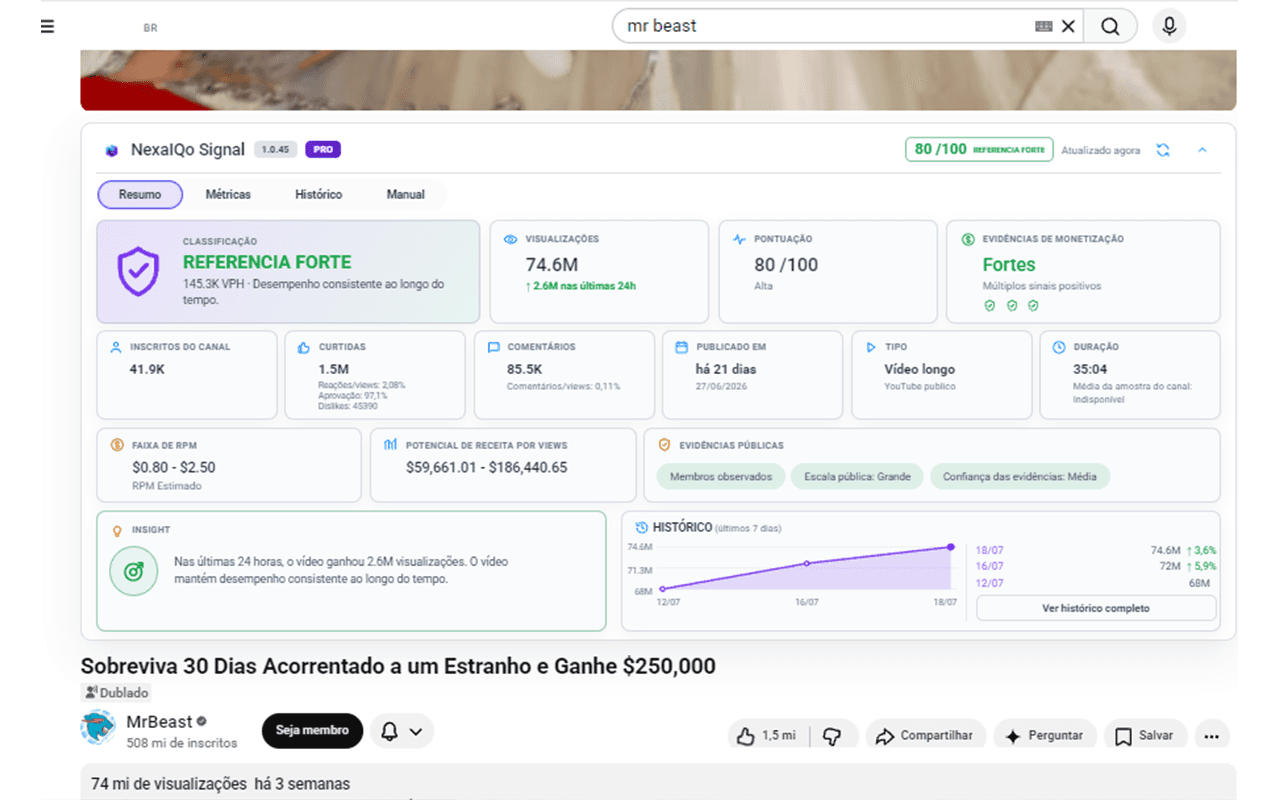
Real analysis inside YouTube
VPH, score, context and visual help without leaving the page.
120+
opportunities analyzed
18
thumbnails produced
6h
of research saved
Illustrative simulation of a monthly routine; it does not represent historical results.
The product
Creators lose hours hunting for ideas and still reach the creative stage without direction. Signal connects discovery, organization and creation in one simple journey: find, save, decide and produce.
Find recent videos with traction signals, strong VPH and enough context to investigate before most people.
Save opportunities, track metrics and understand why each video showed up without relying on loose spreadsheets.
Turn the signals you found into video ideas, analyzed titles and thumbnails ready to test.
Use the extension on YouTube and organize execution inside your NexaIQo My Account.
How it works
The goal is not to show more numbers. It is to help you decide what is worth investigating and turn that opportunity into your own content.
Create your accountUse the Radar and the extension to spot recent videos with VPH, score and context worth investigating.
Organize opportunities, see why they appeared and keep the history ready for analysis.
Generate ideas, test titles and create thumbnails using the signal you found as a starting point.
Discover signals, compare performance and find opportunities across videos, Shorts and channels — all integrated into your YouTube experience.
Open on YouTubeProduct in action
Real extension screenshots showing video, Shorts and channel analysis directly on YouTube.
The panel brings together classification, views, score, monetization signals, engagement and history to support decisions with more context.
Find
Radar and extension help you spot signals faster
Organize
The Library keeps opportunities and context in one place
Create
Ideas, titles and thumbnails are born from the signal
Classification, score, views, engagement, monetization and history brought together in one panel.
VPH, approval, comments, subscribers and revenue potential organized for quick reading.
View curve, recent pace and reading series to track how the video evolves.
Velocity, reach, subscribers, likes and revenue estimate displayed beside vertical content.
Historical average, views, videos, subscribers and channel evolution in a dedicated view.
Real product screens. NexaIQo Signal is an independent tool and is not affiliated with YouTube or Google.
Operating potential
From solo research to team production, the same signal follows the decision all the way to execution.
Use case
Finds signals, saves the best videos and turns the week's research into a production plan.
Use case
Organizes opportunities by topic and uses AI to explore ideas, titles and thumbnails without copying the original.
Use case
Centralizes references and context to reduce rework between research, script and design.
Who it's for
NexaIQo Signal was born to speed up research, validation and content execution for creators, faceless channels, agencies and strategists.
Plans
Plans evolve with your operation, unlocking more extension analysis, Radar, AI and monthly volume.
Compare all plansR$ 0/month
Basic signals on YouTube to get to know the NexaIQo flow.
Create Free accountR$ 59/month
Radar, 300 AI ideas, 120 thumbnails and the full extension to find and validate.
Discover CreatorStart now
Confirm your email, sign in to My Account and follow the guide to install and activate the extension on Chrome or Edge.
FAQ
Yes. Create your Free account, confirm your email and open My Account to follow the extension installation guide.
Yes. The extension works inside YouTube, and the web area organizes Radar, Library, ideas, titles and thumbnails.
In this initial stage, access is officially tested on Google Chrome and Microsoft Edge on desktop. Other Chromium-based browsers may work, but they are not part of the official tests yet.
Not yet. This initial phase focuses on desktop, because the extension needs to run inside the browser on YouTube.
At this stage, each approved email is linked to one browser/device. If you switch computers or browsers, the device can be reset through the admin panel.
Yes. The extension is the entry point, and the web area organizes history, opportunities, ideas, titles, thumbnails, ranking and alerts. Check the Plans page to compare available features.
No. It is an independent research and analysis tool, with no official affiliation with YouTube or Google.